
Our powerful staff monitoring software provides actionable insights into team performance, helping you identify bottlenecks, optimize workflows, and empower your employees to achieve more.

Major Release Announcement • 21st September 2026

New Staff Tracker Release: Major Features

We’re excited to announce the new Staff Tracker release, packed with several powerful features designed to make employee monitoring, scheduling, client management, and task tracking easier and more efficient than ever.

Official Availability Date: 21st September 2026
ACTION REQUIRED New Software & Panel Availability Notice

Desktop Application & Panel Update Notice

The new desktop application and Staff Tracker panel will be accessible starting from 21st September 2026.
Important: The previous desktop application will no longer work after the new version goes live. Please log in to the panel and download the latest desktop application before using the new system.

Feature 01

1. Advanced Dashboard

We have introduced a completely new Advanced Dashboard that gives administrators a clear, real-time overview of individual and team performance.
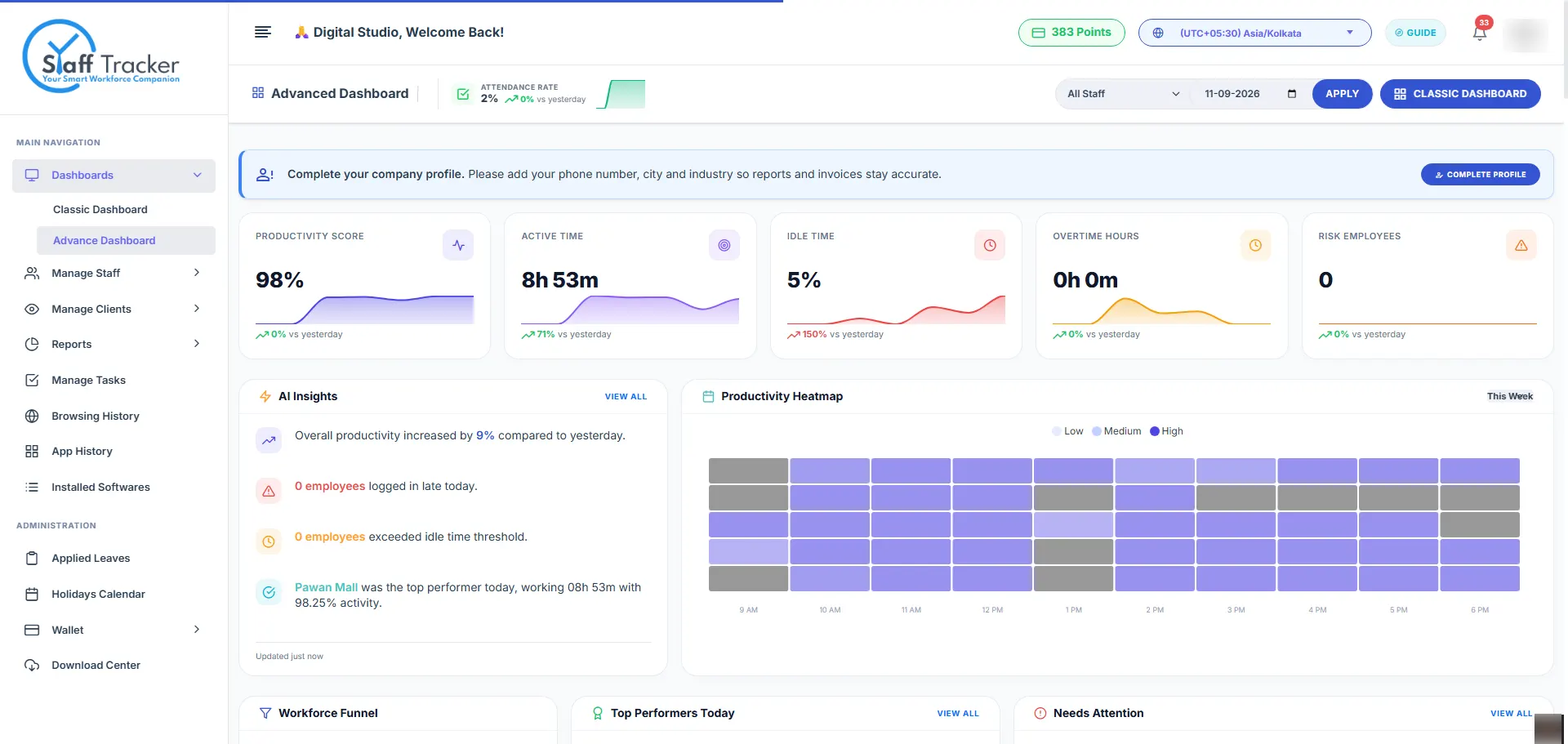
  • Easily identify your best-performing employees: Instant leaderboard with top performers based on active hours and high productivity scores.
  • Quickly identify employees who may need improvement: Automated alerts on low activity, excessive idle time, or irregular work hours.
  • Unified metric insights: View productivity, activity ratios, idle duration, screenshot timelines, and application usage from one single view.
  • Complete team overview: Eliminate blind spots with instant drill-down analytics for managers and business owners.
staff-tracker.com/account/advance-dashboard
LIVE METRICS
Advance Dashboard Staff Tracker
Feature 02

2. Staff Schedule & Time Zone Management

Managing global and distributed teams is now seamless with our brand-new Staff Scheduling System and multi-timezone engine.
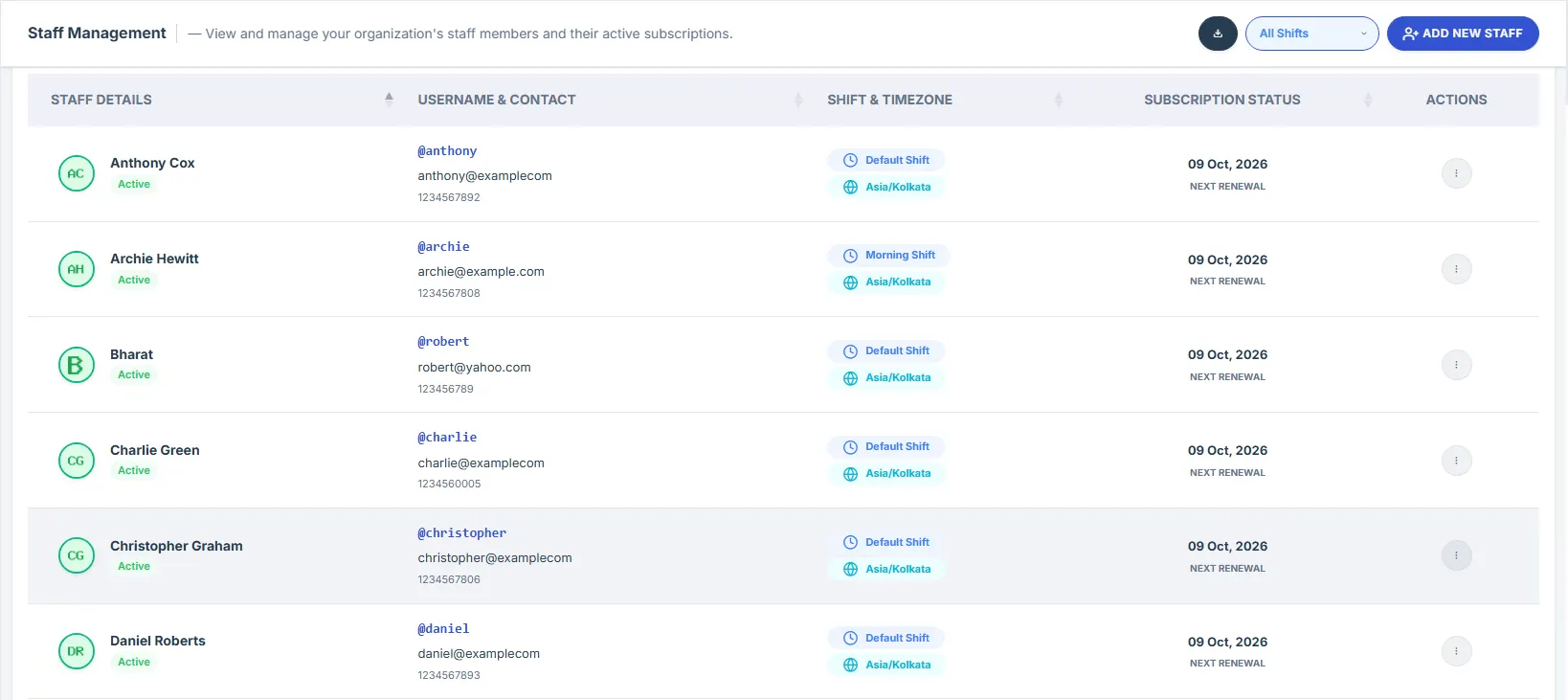
  • Maintain individual schedules for your staff: Configure custom work shifts, flexible working hours, and rest days per employee.
  • Manage employees in different time zones: Automatically converts and synchronizes shifts across UTC, EST, GMT, IST, PST, and more.
  • Track schedule compliance: Instantly detect late clock-ins, early leaves, and unassigned working hours in real time.
  • Centralized schedule dashboard: Plan, adjust, and reassign schedules centrally without relying on external calendar tools.
staff-tracker.com/account/staff-schedules
MULTI-TZ ENABLED
Staff Schedule & Time Zone Management
Feature 03

3. Client-Based Staff Assignment

Elevate transparency while maintaining strict enterprise security. You can now assign specific staff members directly to individual clients.
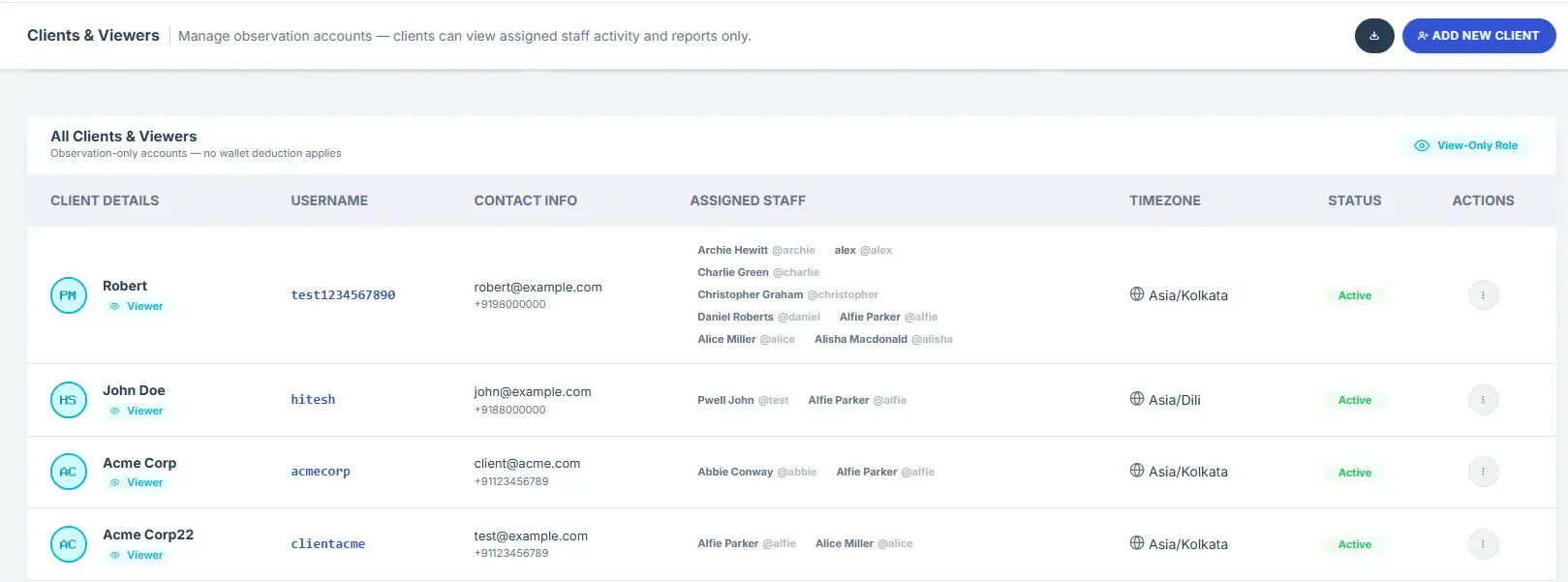
  • Restricted client login visibility: When a client logs into the Staff Tracker panel, they can only view the specific staff members assigned to their account.
  • Client-specific privacy protection: Other company employees, internal staff, and unrelated projects remain completely invisible to the client.
  • Better client relationships & reporting: Clients can monitor progress, screenshots, and logged hours exclusively for their hired team members.
  • Simple one-click assignment: Reassign, add, or remove team members per client from an intuitive admin panel.
staff-tracker.com/client-portal/dashboard
CLIENT VIEW
Client-Based Staff Assignment
Feature 04

4. Screenshot Tagging

Finding proof-of-work has never been faster. You can now tag screenshots to make them effortless to categorize, identify, and audit.

  • Tag and categorize employee screenshots: Attach tags like #CodeReview, #DesignAudit, #BugFix, #ClientCall, or #IdleAlert.
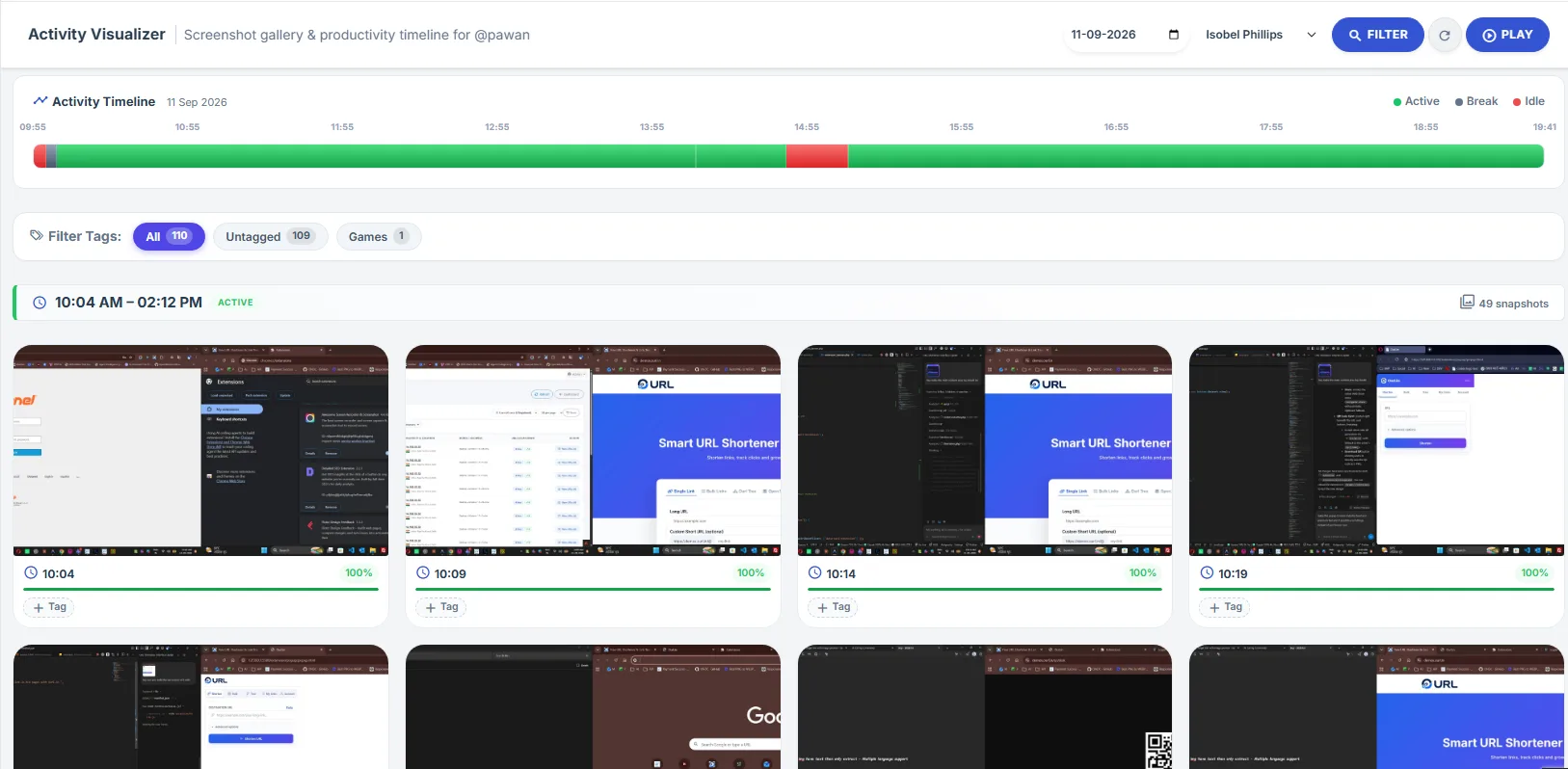
  • Fast filtering & search: Filter thousands of employee captures by tags in seconds without scrolling through endless chronological feeds.
  • Streamlined activity review: Empowers managers, HR, and team leads to quickly verify project-specific contributions and billable hours.
staff-tracker.com/account/screenshots
TAG FILTER
Screenshot Tagging & Activity Visualizer
Feature 05

5. Task Analytics & Task Management

Turn raw tracked time into quantifiable milestones. We have integrated a new comprehensive Task Management and Analytics System.
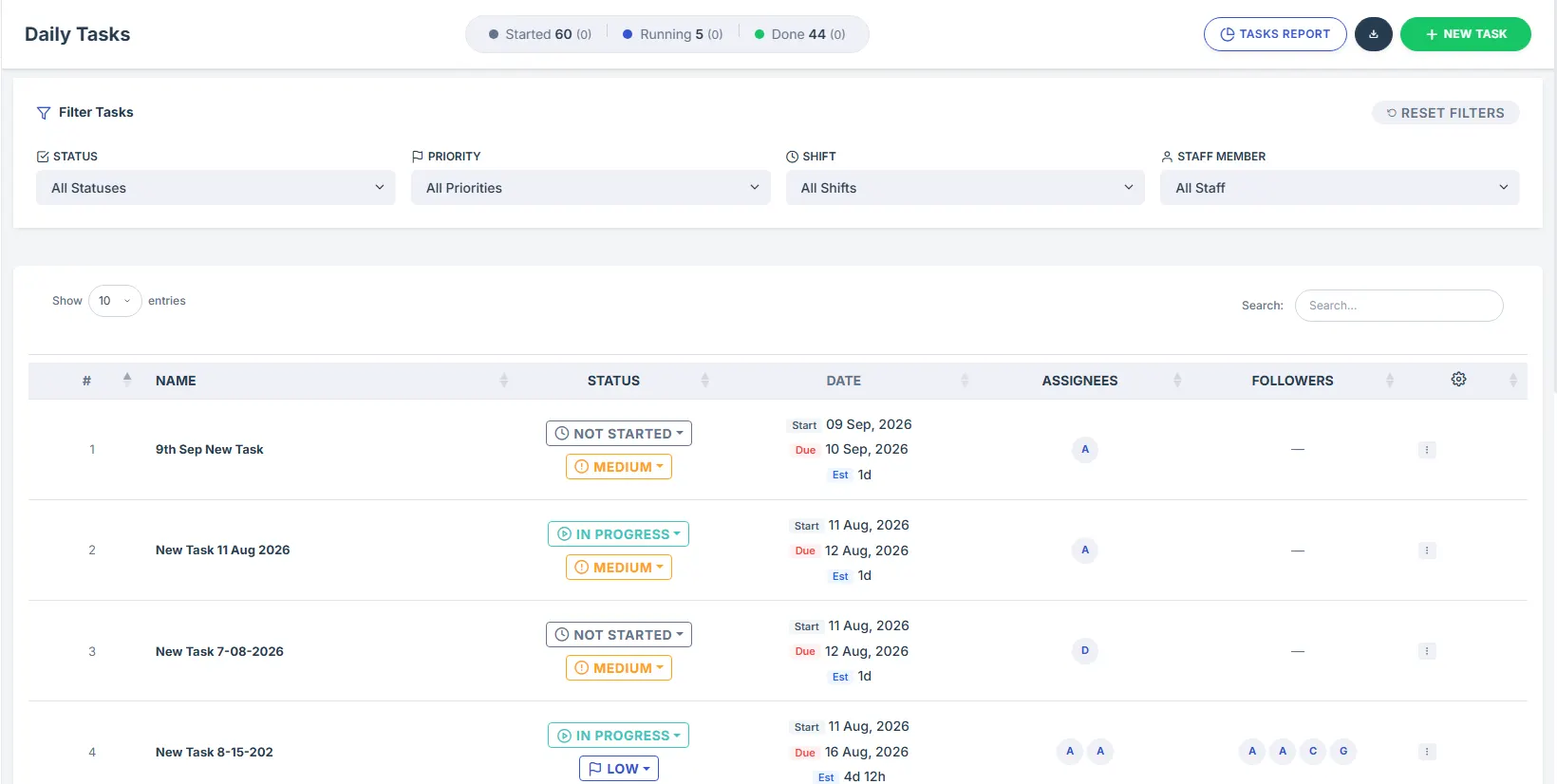
  • Detailed task analytics: Understand which tasks consume the most hours, analyze velocity, and eliminate workflow bottlenecks.
  • Assign tasks to specific staff: Direct assignment with priority levels, descriptions, and estimated completion times.
  • Staff task execution & management: Staff members can view, update, track, and complete assigned tasks right inside their desktop app and web portal.
  • Track task performance & progress: Real-time completion bars, milestone tracking, and manager approvals.
staff-tracker.com/account/tasks-analytics
SPRINT ACTIVE
Task Analytics & Management
Complete Unified Ecosystem

🎯 All-in-One Workforce Management

With these groundbreaking additions, Staff Tracker now provides the market's most comprehensive way to manage employee productivity, schedules, clients, screenshots, tasks, and team performance — all from one intuitive platform.

Performance Insights
Empower every team member to reach their full potential.
Global Timezone Ready
Seamless coordination across all international teams.
Client Access & Privacy
Role-based controls designed for modern agencies.
Next Steps

How to Prepare for the New Release

Follow these 3 simple steps to ensure uninterrupted tracking and instant access to all new capabilities on 21st September 2026.

1

Log In to Your Panel

Sign in to your organization's Staff Tracker dashboard to review updated roles, staff assignments, and client permissions.

Go to Panel Login
2

Download Latest Desktop App

Install the brand-new desktop client. The legacy client will automatically be retired once the new system goes live on 21st September 2026.

Download New App
3

Set Schedules & Tasks

Configure your staff's individual schedules, time zones, screenshot tags, and task lists directly from your updated dashboard.

View Documentation
WE ARE HERE TO HELP

Have questions or need migration assistance?

If you face any issues with the new system, please contact us by email and our team will be delighted to assist you.

Thank you for your continued support!

— The Staff Tracker Team