Hover the picture to zoom in, or click it to open it full size.
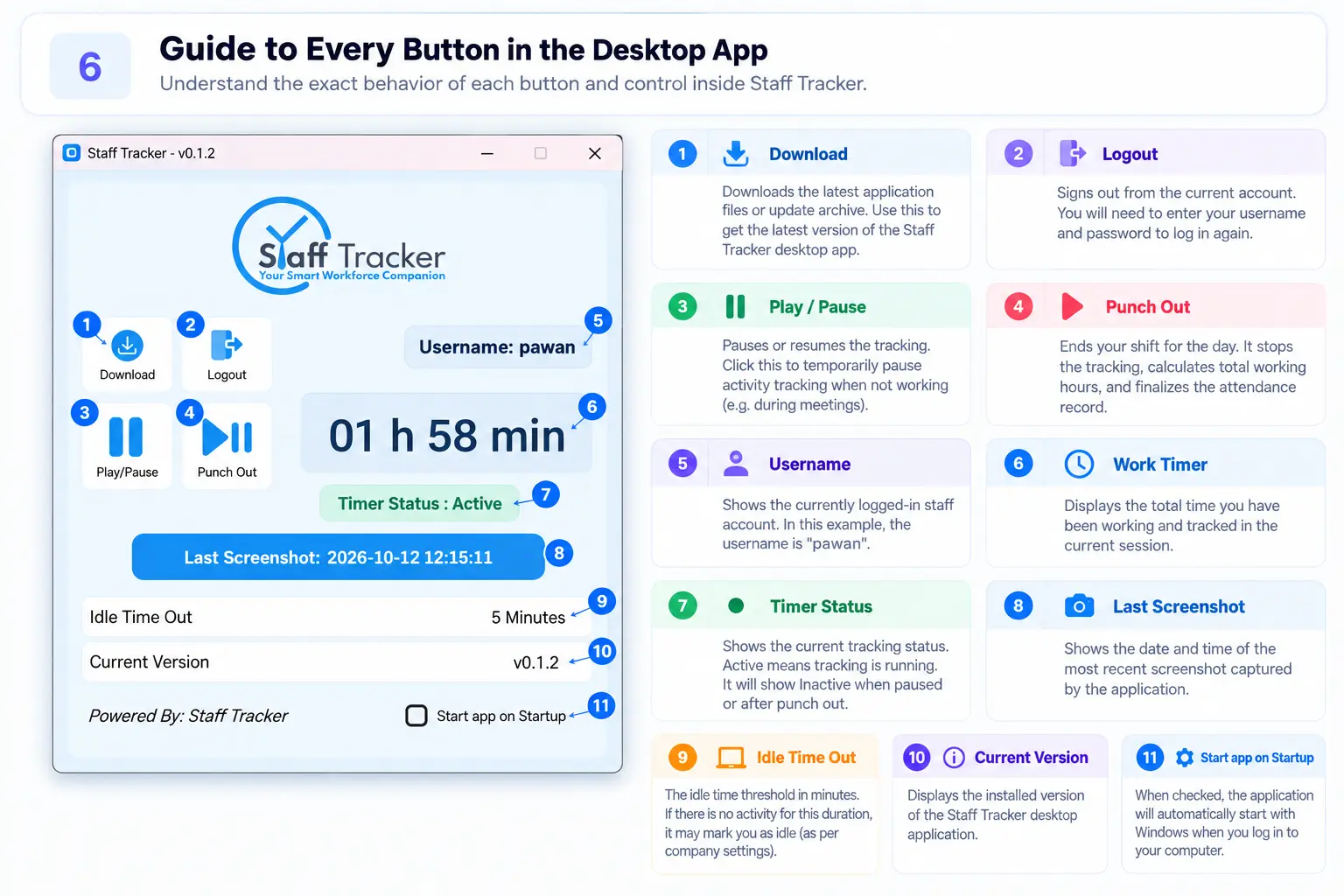
DownloadGets the latest application files or the update archive.
LogoutSigns out of the current account. You enter your username and password to log in again.
Play / PausePauses or resumes tracking, for example during a meeting.
Punch OutEnds your shift for the day. It stops tracking, calculates total working hours and finalises the attendance record.
UsernameShows the staff account that is logged in.
Work timerThe total time worked and tracked in the current session.
Timer StatusShows the tracking status. Active means tracking is running.
Last ScreenshotThe date and time of the most recent screenshot captured by the app.
Idle Time OutThe idle limit in minutes, 5 minutes in this example. It may mark you as idle, as set by your company.
Current VersionThe version of the desktop app that is installed.
Start app on StartupWhen ticked, the app starts automatically when you log in to Windows.