Employee Productivity Reports and Dashboards
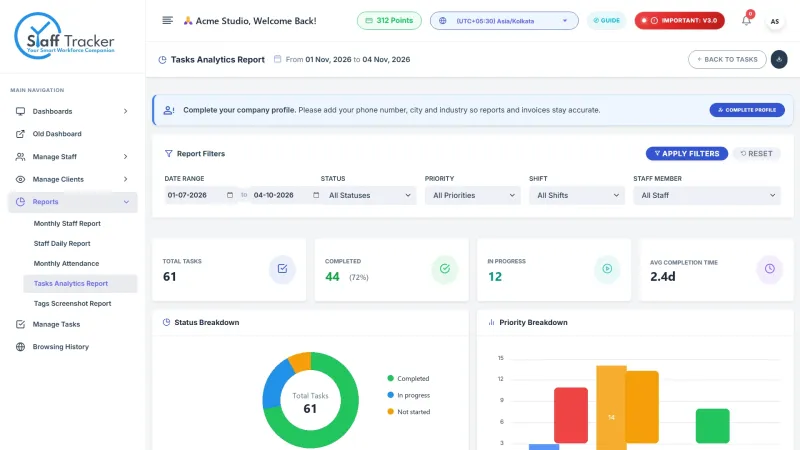
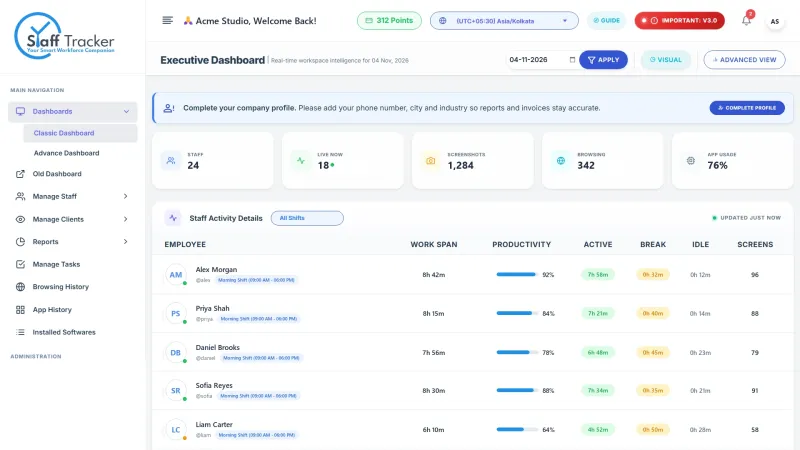
Employee productivity reports show work span, active, break and idle time per person, plus task analytics for any date range. Exports are on the Premium plan.
 Sample data
Read the team in one report.
Pick a person or a shift and a date range, and the report does the adding up.
Work span
Start to finish of each day per employee.
Active time
Time spent working while tracking.
Break and idle
Kept apart from active time.
Task analytics
Tasks by status for any range.
Performance chart
A bar chart view on Standard and above.
Exports
Download data on the Premium plan.
How it works in practice.
Pick a person or a shift and a date range, and the report does the adding up.
- Per-person work span, active, break and idle time
- Date range of your choice
- Task analytics next to hours
- Reports kept for 3 months on Basic, 6 on Standard, 1 year on Premium
 Sample data
Up and running in three steps.
1. Choose the range
Pick a day, week or month.
Manager2. Filter
Choose a shift or one employee.
Manager3. Read or export
Review on screen, or export on Premium.
ManagerQuestions, answered.
Our team will help you pick a plan and set up your team.
Contact supportWork span, active, break and idle time per person, and task analytics for the date range you choose.
Data exports are available on the Premium plan.
3 months on Basic, 6 months on Standard and 1 year on Premium.
Yes. Filter by shift.
Reports you can act on.
Start free and open your first productivity report.