
Your wallet holds the points that keep your staff active. When you need more staff or more months, buy more points from Recharge Wallet in your account.
Buy points
- Open Recharge Wallet
Your current balance, in points, is on the right of the page.
- Choose staff members and months
Enter how many staff members you want to cover and for how many months. Use the − and + buttons or type the numbers. The line under the boxes shows the points and an estimate as you type.
- Click Get Payable Amount
The Order summary shows Points you get (staff × months) and the Amount to pay. If you have an upgrade credit it is taken off here.
- Pay
Click the pay button. In India you pay with Razorpay (UPI, cards or net banking). Other regions pay through PayPal.
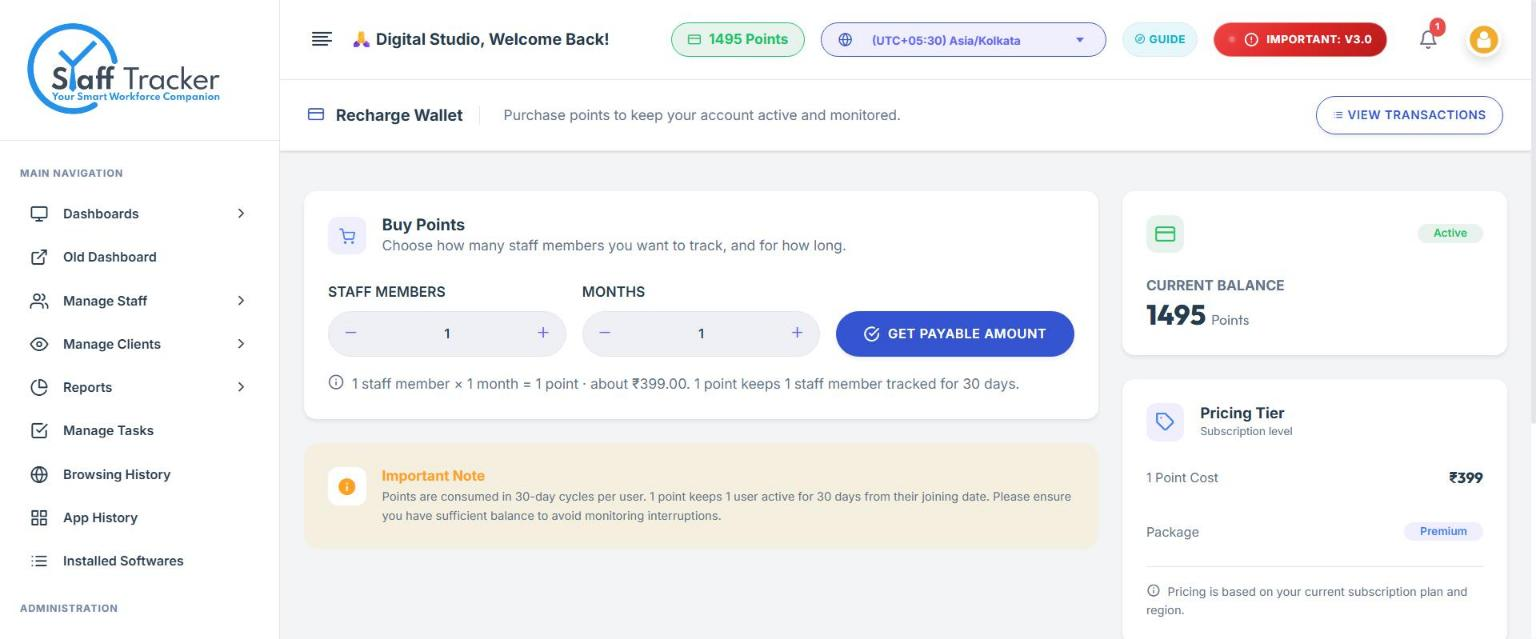
If you change the numbers after calculating, the pay button is switched off until you click Update Amount. This stops you paying for an old amount by mistake.
After you pay
The points are added to your wallet. Use View Transactions at the top of the page to see your payments and receipts.
Common questions
How many points do I need?
Staff members × months. 5 staff for 2 months is 10 points. See Plans, points and pricing.
What happens if the wallet runs low?
Staff are kept active only while there are points to cover them, so recharge before the balance reaches zero to avoid interruptions in monitoring.